AWS
I have a personal account, I don't remember the usernames or IAM, log in with root email option.
AWS resources are managed via: AWS Management Console (the Web UI), AWS CLI, SDKs, API and Cloud shell (web terminal emulator UI available inside AWS management console)
Users can generate their own Access keys (ID + secret)
exam guide, 50 questions, get 30 mins extension.
skillbuilder ofcial mock exam.
tutorialsdojo is partner
Cloud Principles and Concepts
pricing
AWS has 3 pricing fundamentals, following the pay-as-you-go pricing model.
• Compute: • Pay for compute time
• Storage: • Pay for data stored in the Cloud
• Data transfer OUT of the Cloud:
Solves the expensive issue of traditional IT
For renting servers there is on demand, which is the most expensive, but you can also rent Reserved Instances (RI) for periods of 1 or 3 years you are obliged to pay for. You can pay nothing, partially or everything upfront for bigger discounts.
AWS Support: are a collection of Plans that provide various lvls of technical assistance and tools to manage your AWS environment.
Depending if your account is Developer, Business or Enterprise you get benefits like. faster response times, 24 hour support and technical account manager..
Services
Service icons are color coded:
| Category | Icon Color | Example Services |
|---|---|---|
| Compute & Containers | Orange | EC2, Lambda, Fargate, EKS, Lightsail |
| Storage | Green | S3, EFS, EBS, Glacier |
| Database | Blue | RDS, DynamoDB, ElastiCache, Aurora |
| Networking & Content Delivery | Purple | VPC, CloudFront, Route 53, API Gateway |
| Security, Identity, & Compliance | Red | IAM, Secrets Manager, GuardDuty, KMS |
| Management & Governance | Pink | CloudWatch, CloudTrail, Systems Manager, CloudFormation |
| Analytics | Dark Red / Maroon | Athena, Redshift, EMR, Kinesis |
| Machine Learning | Teal / Dark Green | SageMaker, Rekognition, Lex |
| Application Integration | Light Blue / Cyan | SQS, SNS, Step Functions |
Global services
AWS Identity and Access Management (IAM), AWS IAM Identity Center, AWS Organizations, Amazon Route 53, Amazon CloudFront, AWS Global Accelerator, AWS WAF, AWS Shield, AWS Firewall Manager
Most AWS services are region scoped.
- AWS Image Builder (EC2 Image Builder): automate the creation, testing and distribution of "golden" images.
Compute
AWS Compute Services Comparison
-
AWS EC2 (Elastic compute cloud): on demand compute, virtual machine, virtual server.
- Amazon Machines Image (AMI): an image that provides the software that is required to set up and boot and EC2 instance. You must specify an AMI when you launch an instance, for example you can choose a Ubuntu image for your EC2 instance.
-
ECS (Elastic Container Service): manager for containers. it's an orchestrator. often manages EC2 instances. You define Tasks (containers).
- you tell AWS "I have a docker image, run 5 instances of it"
- You have 2 main options for where to put the containers: EC2 and Fargate
-
Fargate: pay as you go service that lets you run and scale containerized apps without managing servers.
- serverless compute engine for containers. it works with ECS (and EKS) to run your containers without you ever having to see, manage or patch a virtual machine.
-
ECR (Elastic Container Registry): storing docker images. Private docker registry on AWS.
-
EKS (Elastic Kubernetes Service): managed kubernetes cluster. Containers can be hosted on EC2 or Fargate.
-
Batch: fully managed batch processing
-
App Runner: you simply point to a GitHub repo or Docker image and the service automatically builds, deploys and scales the web service.
- like Vercel's one-click deployments
- no need to configure ECS, load balancers, VPCs..
-
Lightsail: simplified version of AWS for ppl who find the main console overwhelming. Flat monthly fee $
- AWS' version of DigitalOncean or Linode
- best for wordpress sites and blogs
Choose EC2 if your app isn't containarized and ECS if you are using Docker, it handles the heavylifting of restarting failed containers and spreading them across different zones.
- Elastic Beanstalk: manages and provisions a 3-Tier web app architecture (PaaS)
- AWS markets as 'free' but you pay for the underlying resources. The orchestration is the free part.
- MWAA (Managed Workflows for Apache Airflow)
Storage
see Types of Storage
-
EC2 instance store: high performance hardware disk. Ephemeral (loses data if stopped). good for buffer, cache, temp content.
-
Elastic Block Store (EBS) Volume: network drive (acts like a virtual hard drive) you can attach to instances while they run. Persists even after EC2 stops, unlike EC2 Instance Store.
-
Elastic File System (EFS): network file system that can be attached to many EC2 instances at once. only linux instances in multi-AZ
-
Amazon FSx: Launch 3rd party file systems on AWS, some available are FSx for Lustre, Windows server File Server and NetApp ONTAP
-
Amazon S3: File storage
-
- Integrated into S3 as a storage class. Glacier as a separate service is now deprecated.
- vaults are the data container for legacy Glacier. You store Archives which are single, often massive zip files.
- with the cheapest option it can take many hours - 2 days to retrieve data.
-
Backup: centrally manage and automate backups across AWS services. Point in time recovery
- Cross-Region and Cross-Account backups.
Database
-
RDS: fully managed relational DB. similar to installing DB engine on EC2 manually but leaving provisioning and maintenance to AWS.
- supports most SQL DBs.
- it's possible to set up automatic scaling (increase in storage size), but it's not native like Aurora
-
Aurora: Relational DB
- has a serverless option; instantiation and scaling is automated based on usage.
- storage is separate from the instance. 6 copies in 3 availabitlity zones.
- native scaling
- just postgres and mysql
- more expensive but better in most senses; performance, availability and durability, resiliency, storage, scalability... so should be more cost effective
-
DynamoDB: NoSQL DB. has Accelerator feature
-
DocumentDB: "AWS implementation" of MongoDB (just like Aurora)
-
ElastiCache: Managed Redis / Memcached. In-memory DB used to reduce load off DBs and has high performance and low latency.
-
Neptune: managed Graph DB.
- A graph dataset would be a social network. Good for knowledge graphs (wikipedia), fraud detection, recommendation engines.. -
Timestream: managed time series DB.
- Data that evolves over time. Like asset prices.
-
QLDB (Discontinues): Quantum Ledger DB. For recording financial transactions. Serverless.
- immutable. used to review changes made to app data over time. Centralized DB.
-
Amazon Managed Block Chain:
-
Athena: Serverless query service to perform analytics against S3 objects. Also makes easy to run Apache Spark analytics.
-
Glue: serverless managed ETL (extract, transform, load) service. Prepare data for analytics.
- Glue Data Catalog: catalog of data sets that can be used by Athena, Redshift, EMR...
-
Elastic Map Reduce (EMR): managed Hadoop or Apache Spark clusters (Big Data)
-
Quicksight: Serverless machine learning-powered business intelligence service to create interactive dashboards.
-
AWS Migration Service: helps migrate databases to AWS.
Networking & Content Delivery
-
VPC (Virtual Private Cloud) and other network components: Let's you launch AWS resources into a logically isolated virtual network that you define. It has it's own subnets, route tables, internet gateway (IGW), Security Groups & NACLs
-
Route 53: DNS, registering new domains.
-
AWS Cloudfront: CDN, edge static content distribution (such as html, js, css, imgs...)
-
API Gateway: service to manage apis. Serverless, Supports REST and Websocket APIs
Relevant: Stop Confusing API Gateway, Load Balancer And Reverse Proxy -
WaveLength: Wavelength zones are infrastructure that let's you deploy on the edge of the 5G network. You can deploy EC2 instances, EBS, VPC...
- Use cases: Smart Cities, ML-assisted diagnostics, Connected Vehicles, Interactive Live Video Streams, ARWR, Real-time Gaming, ...
-
Outposts: Hybrid cloud. AWS installs and sets up on premise servers for you.
- now your on-prem servers extends your AWS cloud services, instead of having two completely separate infrastructure.
- you get billed fixed hardware fee. and you can run all that the hardware can handle locally.
-
- S3 Transfer accelerator increases transfer speed in a similar fashion. test speeds
I created an Amazon family long to set up Alexa to use a device we bought long ago. But we never used it.
Recently my brother started buying a lot of Alexa and home devices and set up an Alexa Amazon Family with his account but I believe I can't join because I'm in my own Amazon Family.
I need help to delete my own Amazon Family and join my brother's
Application Integration
"Glue services". This services apply the principle of decoupling, they allow different software components to talk to each other without being tightly connected.
In a traditional tightly couple architecture, if service A wants to send a msg to service B, it must have a direct connection to it, if something goes wrong with either service it often leads to many errors. Tighly coupled systems often need to know things like where the service is located, if it's up, if it's currently busy, etc...
By placing services like SQS and SNS between services they no longer need to know everything about each other to function.
A common "golden" pattern is to put SNS in front of many SQS queues. This way you get both the broadcast capability of SNS with the combined reliability and buffering of SQS.
-
Simple Queue Service (SQS): Message Queue (point to point)
- pull-based service. Your consumer apps must actively poll the queue to take a message off it. Once a consumer processes and deletes that message, it is gone.
- Best For: When you need to ensure a message is processed exactly once (in FIFO mode) or at least once (in standard mode)
-
Simple Notification Service (SNS): Publish/Subscribe message delivery service
-
Simple Mail Service (SES): mail server.
- popular use cases: transactional emails (like password resets), bulk emailing like marketing, inbound email processing (receive and route emails to other services)
-
MQ: Managed Message Broker.
- Supports both queue-based and topic-based messaging but it's built to support legacy messaging protocols that old enterprise software still relies on.
- same functionality as brokers you would run on private servers like Apache ActiveMQ
- If you are moving a legacy application to the cloud that is already hard-coded to talk to an on-premises ActiveMQ or RabbitMQ server, you use Amazon MQ so you don't have to rewrite your code.
In most cases you want to choose the 'cloud native' services (SQS, SNS) over MQ. serverless, cost efficiency, better integration with other AWS services,
-
AWS Event Bridge: event driven routing
Machine Learning
- Rekognition: computer vision SaaS, image recognition and video analysis
- Transcribe: speech to txt
- Polly: txt to speech
- Translate: language translation
- Amazon Lex: Automatic Speech Recognition (ASR) to convert speech to text (same technology that powers Alexa)
- Natural Language Understanding to recognize the intent of text, callers
- Helps build chatbots, call center bots
- Amazon Connect: Receive calls, create contact flows, cloud-based virtual contact center
- Can integrate with other CRM systems or AWS.
- Amazon Comprehend: Natural Language Processing (NLP). Understanding the meaning of text.
- SageMaker: service to build ML models.
- Forecast: service that takes your historical time-series data and uses ML to deliver forecasts.
- Kendra: document search service. Index and extract answers from documents. Doc sources can be S3, RDS, Google Drive, OneDrive..
- Personalize: real-time personalized recommendations. Example: amazon product recommendations.
- Textract: OCR... Extract text from images and scanned documents.
Analytics
- Kinesis: platform for real time streaming, allowing to collect, process, and analyze video and data streams in real time.
- Redshift: data warehouse,
Security, Identity, & Compliance
- IAM (Identity and Access Management): manage AWS user permissions. AWS IAM
- KMS (Key management service): automatic encryption service. For data at rest.
- AWS manages encryption keys.
- Integrates with other secret storing services when you save values as a
SecureStringtype. Instances must havekms:Decryptalong the other service's permissions.
- CloudHSM: AWS Provisions encryption hardware (physical rack). we manage the encryption keys.
- Secrets Manager: secure storage of secrets that require automatic rotation. (mostly meant to integrate with RDS)
observability
-
Security Hub: Central security tool to manage security across several AWS accounts and automate security checks. Integrated dashboard that aggregates alerts from many security services.
-
GuardDuty: Intelligent Threat discovery to protect your AWS Account
- Uses Machine Learning algorithms, anomaly detection, 3rd party data
- inputs it analyzes include: CloudTrail logs, VPC Flow Logs, DNS logs and more
-
Macie: use machine learning to identify and alert sensitive data, Personally Identifiable Information (PII).
- Analyzes Amazon S3 buckets, and notifies through AWS Event Bridge
-
Detective: analyzes, investigates, and quickly identifies the root cause of security issues or suspicious activities (using ML and graphs)
- other services are used to identify potential security issues and findings. Detective does deeper analysis to find the root cause and take action.
- Automatically collects and processes events from VPC Flow Logs, CloudTrail, GuardDuty and create a unified view
-
Inspector: automated vulnerability management service. Scans AWS workloads for software vulnerabilities and unintended network exposure.
- for EC2 instances. analyzes unintended network access, the running OS,
- for ECR container image pushes to ECR.
- For lambda it analyzes the function code and deps.
- Integrates with Security Hub and Event Bridge
-
Trusted Advisor: provides recommendations about security, performance, cost optimization and fault tolerance.
-
AWS Config: auditing and recording compliance of your AWS resources
- track config changes over time.
- can store config data and analyze it with Athena.
-
IAM Access Analyzer: Find out which resources are shared externally
-
AWS Artifact: (not really a service) portal where you can download compliance docs and agreements.
-
AWS Abuse: Report suspected AWS resources used for abusive or illegal purposes
DDOS protection
AWS Shield Standard, AWS Shield Advanced (24/7 premium protection), WAF (firewall, filter requests based on rules), CloudFront and Route 53 (availability protection using global edge network), Auto Scaling
-
AWS Firewall Manager: Manage security rules in all accounts of an AWS Organization. VPC Security Groups (for EC2, Application Load Balancer, etc...) WAF rules, AWS Shield Advanced, AWS Network Firewall
-
WAF (Web App Firewall): custom rules to block malicious traffic.
- Protects your web app from common web exploits (Layer 7) - (SQL injection and cross-site scripting XSS)
- deploy on ALB, API Gateway, CloudFront
- can filter requests based on IP, HTTP headers, HTTP body, URI strings. geo-match(block countries), size constraints
- rate-based rules
-
AWS Network Firewall: Firewall for VPCs. Protects Layer 3 through Layer 7 for entire VPCs (replaces or enhances basic security groups).
-
Shield: provides managed distributed denial of service (DDoS) protection for apps running in AWS.
- Layers 3, 4, and 7 from DDoS attacks.
- has 2 tiers; one free standard and an advanced on for enterprise.
- think Shield standard as a default feature that's always on
-
AWS Certificate Manager (ACM): Let's you easily provision, manage, and deploy SSL/TLS Certificates used to provide in-flight encryption for websites (HTTPS)
- Supports both public and private TLS certificates (free for public TLS certificates)
- Automatic TLS certificate renewal
- Integrations with (load TLS certificates on): - Elastic Load Balancers - CloudFront Distributions - APls on API Gateway
Advanced identity
- Security Token Service (STS): create security tokens; temporary, limited-privilege credentials for your AWS resources
- Cognito: Auth solution for web and mobile apps. integrates with your own users DB or OAuth providers like Google, Microsoft...
- Directory Service: Microsoft Active Directory integration
- IAM Identity Center: one login for multiple AWS accounts in your org.
- when I logged into snapshot AWS I did it via Identity Center. I actually had 3 AWS accounts, one for each environment.
pen testing
AWS customers are welcome to carry out security assessments or penetration tests against their AWS infrastructure without prior approval for 8 services:
Click to view the 8 permitted services
• Amazon EC2 instances, NAT Gateways, and Elastic Load Balancers
• Amazon RDS
• Amazon CloudFront
• Amazon Aurora
• Amazon API Gateways
• AWS Lambda and Lambda Edge functions
• Amazon Lightsail resources
• Amazon Elastic Beanstalk environments
Prohibited Activities
- DNS zone walking via Amazon Route 53 Hosted Zones - Denial of Service (DoS), Distributed Denial of Service (DDoS), Simulated DoS, Simulated DDoS - Port flooding - Protocol flooding - Request flooding (login request flooding, AP| request flooding)-
Compute Optimizer: recommends resources' configs to reduce cost
-
Billing Dashboard: high lvl overview + free tier dashboard
-
Cost Allocation tags: tag resources to create detailed reports.
-
Billing Alarms
-
Budgets: track usage, costs, RI and get alerts. Let's you set custom spending limits
-
Savings Plan: save $ based on long term usage of AWS.
-
Cost Anomaly Detection: detect unusual spends using machine learning.
-
Service Quotas: notify you when you're close to service quota threshold.
-
Amazon VPC IP Address Manager (IPAM): monitor all IP addresses in your account
Management & Governance
pink
-
CloudFormation: infrastructure as code - Terraform competitor - templates
-
AWS Cloud Development Kit (CDK): like Cloudformation or terraform, it's another way to declare your infrastructure as code but via programming languages
-
CodeBuild: build code in cloud. compilation, run tests, produce run-ready packages that are ready to be deployed
-
CodeDeploy: deploy app automatically
- Hybrid service bc works on EC2 instances and on-premises server.
- must install CodeDeploy agent on the server.
- Most modern platforms like GitHub Action bundle compilation (CI) and deployment (CD) together. CodeDeploy is equivalent to just the deployment phase or runners
-
CodeCommit (DEPRECATED): Git repo storage. use GitHub/GitLab.
-
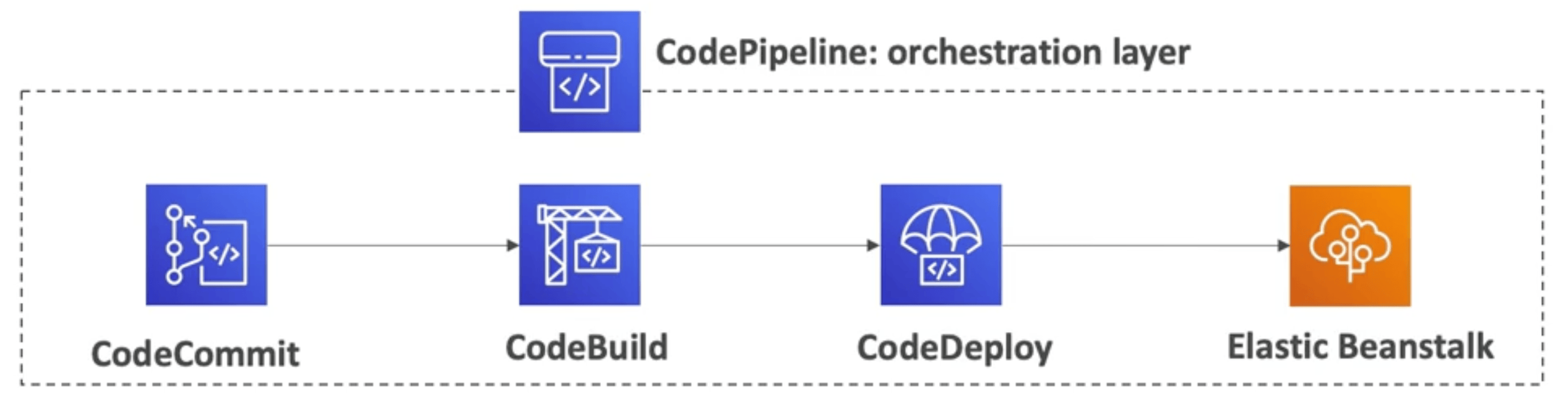
CodePipeline: orchestrate steps to have code automatically pushed and deployed to prod.
- basic steps are Code => Build => Test => Provision => Deploy. But they could be more complicated.
- basis for CI/CD
-
CodeArtifact: artifact management service.
- Works with common dependency management tools such as Maven, Gradle, npm, yarn, twine, pip, and NuGet
- devs and CodeBuild can retrieve dependencies from CodeArtifact.
- Software packages depend on each other to be built. Storing and retrieving dependencies is called artifact management.
-
AWS Systems Manager (SSM): manage EC2 and on-prem systems at scale (hybrid).
- need to install SSM agent program onto systems to control.
- operational insights
- patching automation, run commands across fleet of servers, store parameter configuration (with SSM Parameter Store)
-
SSM Session Manager: let's you start a terminal session via the browser (AWS Management Console) without using SSH
-
SSM Parameter Store: secure storage for static configs and secrets (API keys, passwords, configs...). Serverless, scalable, durable, ez SDK. Controll access perms using IAM
-
AWS AppConfig: secure store for dynamic configurations and feature flags.
Monitoring, Logs
- AWS CloudWatch: monitoring performance and health of your resources, metrics. (what is happening)
- Cloud Trail Logs: audit actions taken within your account (who did what)
- AWS X-Ray: Debugging
- AWS Health Dashboard: monitoring health of AWS services.
- sends notifications and remediation guidance when things happen that may impact you.
- CodeGuru: analyzes code and provides performance recommendations
Other Services and Distractor services
"distractors" because they are not core services, they are for very specific use cases. They may appear in the exam as wrong answers.
Quicksight, Cognito, AppStreams, Server Migration Service, etc...
-
WorkSpaces: Desktop as a Service solution to easily provision Windows or Linux desktops.
-
AppStream 2.0: Desktop app streaming service. app is accessible via Web browser
-
IoT Core: connect IoT devices to AWS
-
Elastic Transcoder: convert media files stored in S3 into file formats required by consumer devices.
-
AppSync: Managed GraphQL service and AppSync events (Pub/Sub APIs) (WebSockets)
-
Amplify: suite of tools that help you develop and deploy scalable web and mobile apps.
- backend as a service AND Hosting
- BaaS; auth, serverless functions, appsync/graphql..
- Hosting; point to git and deploy like Vercel
- high abstraction, low control.
- mainly for front-end devs who don't want to mess around much with backend.
- fully serverless
- Backend as a service - Firebase, Supabase, Amplify
- backend as a service AND Hosting
-
Application Composer: drag and drop GUI to design, build and deploy serverless apps on AWS.
- generates infrastructure as code (IaC) templates using CloudFormation.
-
Device farm: test your apps against desktop browsers and real mobile devices.
-
Elastic Disaster Recovery (DRS): quickly recover your servers into AWS.
- continuous block-lvl replication of your servers from your data centers into AWS.
- low-cost EC2 & EBS volumes.
-
DataSync: move large amount of data from on-prem to AWS. Can sync to any AWS storage class. scheduling.
- replication tasks are incremental after the first full load
-
Fault Injection Simulator (FIS): service for running fault injection experiments.
- testing fault tolerance of your system. how it responds to stress and disruptive events.
- supports EC2, ECS, EKS, RDS...
-
AWS Step Functions: Build serverless visual workflow to orchestrate your Lambda functions
- Features: sequence, parallel, conditions, timeouts, error handling, ... human approval feature.
- Can integrate with EC2, ECS, On-premises servers, API Gateway, SQS queues, etc...
-
AWS Ground Station: Satellite communication
-
Amazon Pinpoint: 2-way (outbound/inbound) marketing communication service
- supports email, SMS, push, voice and in-app messaging.
- in SNS & SES you manage each msg's audience, content and delivery schedule. With Pinpoint you create msg templates, delivery schedules, targeted segments and full campaigns.
network components
many services have fundamental networking components
- Security Groups (Resource-Level): act as a firewall for individual resources. You can apply them to RDS, Lambda, Load Balancers, Elasticache...
- stateful: traffic in is automatically allowed out
- Network ACLs (Subnet-Level): act as a firewall for an entire Subnet. They affect every single resource inside that subnet.
- stateless: you must write rules for both ways, in and out.
Disaster recovery
from cheapest to most expensive
- backup and restore
- Pilot Light: run minimal core functions of the app (just the DB for example)
- warm standby: full version of the app ready on the cloud but at min size of resources
- multi-site / hot-sit: full version of the app ready on the cloud but at full size of resources
so if there is a disaster in us-east-1 that affects our instances with Route 53 we can just failover and redirect all traffic onto instances in another region like eu-west-2
Migrating
Cloud Migration Strategies - 7 Rs
AWS Migration Strategies and Services
- AWS Application Discovery Service: gathers info about on-premises data centers.
- gathers server utilization and dependency mapping
- agentless discovery (AWS Agentless Discovery Connector)
- VM inventory, config, performance history
- Agent-based Discovery (AWS Agentless Discovery Agent)
Resulting data can be viewed in Migration Hub Service
-
AWS Application Migration Service (MGN):
- used to be called CloudEndure Migration
- lift-and-shift (rehost) solution.
- converts your server to run natively on AWS
The idea is that you do continuous block-lvl replication of your on-prem server onto a staging EC2 and EBS volumes and one day you cutover and provision full sized resources for production.
-
AWS Migration Evaluator: helps you build a data-driven case for migrating to AWS
First you install Agentless Collector to gather data on what your org is running today. Then you pass that data to Migration Evaluator, review the Quick Insights report and build a business case (AWS provides expert support (aka salesman) if needed) -
Migration Hub: central location for assessment, planning, and tracking of migrations to AWS
- Helps accelerate your migration to AWS, automate lift-and-shift
- AWS Migration Hub Orchestrator - provides pre-built templates to save time and effort migrating enterprise apps (e.g., SAP, Microsoft SQL Server...)
Architecting & Ecosystem
- AWS Architecture center: contains official reference architectures, solution designs, best-practice guidance, and architecture diagrams for building on AWS.
- Well Architected Tool: survey to check how well architected your system is -
- Customer Carbon Footprint Tool: Track, measure, review, and forecast the Carbon emissions generated from your AWS usage
AWS Cloud Adoption Framework (CAF)
Right sizing: there are many instance types. you should match your instance types and size to your workload. You should always start small and scale up. You should constantly monitor your system and look for opportunities for sizing up or down.
Ecosystem:
-
blogs, forums, whitepapers & guides
-
Partner Solutions (formerly Quick Starts)
- Cloudformation templates to automatically deploy production environments.
- For example there is an official, highly scalable Wordpress template that deploys a bunch of stuff for you.
-
AWS Solutions:
- replaced by AWS Control Tower: is a managed service designed to simplify the process of setting up and governing a secure, multi-account AWS environment.
-
Marketplace: 3rd party software listings from independent vendors.
- for example you can buy a custom AMI (images), SaaS, Containers, CloudFormation templates..
-
Training given directly by AWS. can be digital (online) or classroom training (in-person or virtual)
-
AWS Academy: help universities teach AWS.
-
AWS Partner Network (APN)
- Companies that provide AWS expertise services - They work alongside your team and a chosen member of the APN - Example: Flatiron Software
- they can be Tech partners (provide hardware), Consulting (help build on AWS) and Training (help you learn AWS)
- Competency program: they rank partners on how good they are.
- Navigate Program: help partners become better partners.
-
AWS IQ You can find and interact (contract and pay) professionals (partners) to help you with your project via AWS IQ. Like a freelancer platform (Fiverr)
-
AWS re:Post: Q&A forum; stack overflow.
- "Knowledge center" contains the most popular questions and requests.
-
AWS Managed Services (AMS): engineers that AWS can provide you for infrastructure and app support on AWS
- a bit of a confusing naming.
- you contact sales to get a hold of them.
- they implement you best practices; improved security, compliance, reduced costs
- a lot of what they do is automated